How to Buy Bitcoin in Canada (Beginner’s Guide)
If you’re new to Bitcoin, you might feel overwhelmed.
You’ve probably heard about exchanges, wallets, private keys, regulations, and taxes — and it can sound complicated.
The good news?
Buying Bitcoin in Canada is actually simple when you understand the steps.
This beginner-friendly guide walks you through everything — clearly and calmly — so you can buy your first Bitcoin with confidence. If you’re ready to get started right away, you can securely Buy Bitcoin in Canada through a regulated, Bitcoin-focused platform.
Step 1: Understand What You’re Buying
Bitcoin is digital money.
There are no physical coins. It exists on a public network called the Bitcoin blockchain. When you buy Bitcoin, you own a portion of that network.
You can:
● Hold it long-term
● Send it anywhere in the world
● Store it yourself securely
But before buying, you need a few basic things.
What You Need Before You Start
To buy Bitcoin in Canada, you’ll need:
1. Government ID
A driver’s license or passport.
All regulated Canadian platforms must verify your identity under federal law.
2. A Canadian Bank Account
You’ll transfer Canadian dollars (CAD) from your bank to buy Bitcoin.
3. A Whitelisted Bitcoin Wallet (Recommended)
Before you can make a deposit, you’ll need to add the Bitcoin wallet where you’d like your purchases delivered.
Simply:
- Enter your Bitcoin wallet address.
- (Optional) Add a nickname to help identify your wallet.
- Confirm the wallet using the verification email we send you.
Once confirmed, your wallet becomes your Whitelisted Wallet, and all future Bitcoin purchases will be sent directly to this address.
For your security:
- Wallet changes require email confirmation and two-factor authentication (2FA).
- A 24-hour security waiting period applies whenever you change your Whitelisted Wallet.
- Wallet changes cannot be made while a deposit or Bitcoin purchase is in progress.
Related Article:
How to Add a Whitelisted Wallet Address
Step 2: Choose Where to Buy Bitcoin
Not all platforms are the same.
In Canada, there are three common options:
Bitcoin-Only Platforms
These focus only on Bitcoin.
No altcoins. No trading distractions.
Simple, direct ownership.
Multi-Asset Trading Platforms
These offer dozens of digital assets and trading features.
They’re often designed for active traders, not long-term holders.
Bitcoin ETFs
These are stock market products that track Bitcoin’s price.
You do NOT own Bitcoin directly, and you cannot withdraw it.
If your goal is to actually own Bitcoin and control it yourself, a regulated Bitcoin-only platform is usually the simplest path. Investors moving larger amounts may prefer Bitcoin OTC Canada services for personalized execution and deeper liquidity.
What “Regulated” Means in Canada
Legitimate platforms in Canada must register as a Money Services Business (MSB) with FINTRAC (the federal regulator).
This means they must:
● Verify your identity (KYC)
● Monitor transactions
● Follow anti-money laundering laws
● Report to federal regulators
If a platform is not FINTRAC-registered, it is operating illegally in Canada.
Always verify registration before sending money.
Step 3: Create and Verify Your Account
Once you choose a platform:
- Enter your basic information (name, email, phone number).
- Upload your government ID and a proof of residence document
- Take a selfie for identity verification.
Verification usually takes a few minutes to a few hours.
You can’t buy Bitcoin until this step is complete.
Step 4: Fund Your Account
After verification and wallet whitelisting, deposit CAD
Once your account has been fully verified and your Whitelisted Wallet has been activated, you’re ready to make a deposit.
Click Deposit and choose your preferred funding method:
- Interac e-Transfer
- Bank Wire (Unavailable at the moment)
Follow the instructions carefully to complete your deposit.
Related article:
Step 5: Buy Your Bitcoin
Once your Canadian dollar deposit is received, it is automatically applied toward a Bitcoin purchase.
Your Bitcoin is then delivered directly to your active verified Whitelisted Wallet.
There is no need to manually place a buy order.
Many Canadians choose to Buy Bitcoin in Canada through simple one-time purchases or automated recurring plans.
One-Time vs Automatic Purchases
Many platforms let you set up recurring purchases.
This is called Dollar-Cost Averaging (DCA).
Instead of trying to guess the perfect time to buy, you:
● Buy weekly
● Or bi-weekly
● Or monthly
This helps smooth out price volatility and removes emotional decision-making.
For beginners, this can be a very comfortable way to start.
Step 6: Move Bitcoin to Your Own Wallet
This is the most important step.
When Bitcoin sits on a platform, the platform controls the private keys — not you.
That creates risk.
If the platform:
● Gets hacked
● Freezes accounts
● Goes bankrupt
You could lose access.
That’s why the phrase exists:
Not your keys, not your Bitcoin.
How to Withdraw to Your Wallet
- Open your wallet app.
- Copy your receiving address (a long string starting with 1, 3, or bc1).
- Paste it into the withdrawal section on the platform.
- Double-check the address carefully.
- Confirm the withdrawal.
Bitcoin transactions are irreversible. Always double-check.
Transactions typically confirm within 10–60 minutes.
What Type of Wallet Should You Use?
Software Wallet (Mobile or Desktop App)
● Easy to use
● Good for smaller amounts
● Examples: BlueWallet, Sparrow, Electrum
Hardware Wallet (Physical Device)
● Most secure option
● Best for long-term storage
● Your private keys never leave the device
● Examples: Ledger, Trezor, Coldcard
If you’re holding more than $5,000 CAD worth of Bitcoin, a hardware wallet is strongly recommended.
Backing Up Your Wallet (Critical)
When you create a wallet, you receive a seed phrase (12 or 24 words).
Write it down.
Store it offline.
Never share it.
Never store it in email or cloud storage.
If you lose your seed phrase and your device fails, your Bitcoin is permanently gone.
Common Beginner Mistakes
Leaving Bitcoin on a platform long-term
Not backing up your wallet
Sending to the wrong address
Using unregulated platforms
Falling for “guaranteed return” scams
Panic selling during volatility
Bitcoin is volatile. That’s normal.
Long-term thinking helps reduce emotional decisions. When the time eventually comes to liquidate, use a regulated service to Sell Bitcoin Canada safely and compliantly.
What About Taxes?
In Canada, Bitcoin is treated as a commodity.
● Buying Bitcoin is NOT taxable.
● Selling Bitcoin is taxable (capital gains or business income).
● Spending Bitcoin is also taxable.
Keep records of:
● Purchase dates
● Amounts
● Prices
You’ll need them if you sell.
What Happens After You Buy?
You now own Bitcoin.
You can:
● Hold it long-term as savings
● Transfer it globally
● Use it where accepted
The most important decision is custody — holding your own keys securely.
That’s what separates speculation from ownership.
Businesses and corporations exploring strategic allocations can learn more about Corporate Treasury Bitcoin Canada solutions tailored to long-term balance sheet management.
Beginner Buying Checklist
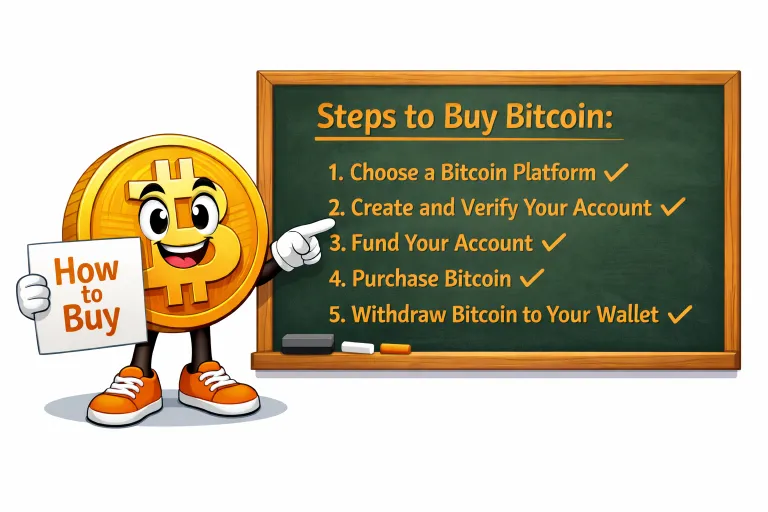
✔ Choose a FINTRAC-registered platform
✔ Complete identity verification
✔ Fund your account
✔ Buy Bitcoin
✔ Withdraw to your own wallet
✔ Secure your seed phrase
✔ Keep records for taxes
Final Thoughts
Buying Bitcoin in Canada is straightforward once you understand the steps.
It doesn’t require trading.
It doesn’t require speculation.
It doesn’t require complexity.
Start small.
Move slowly.
Learn as you go.
The goal isn’t to rush.
It’s to own Bitcoin properly and securely.